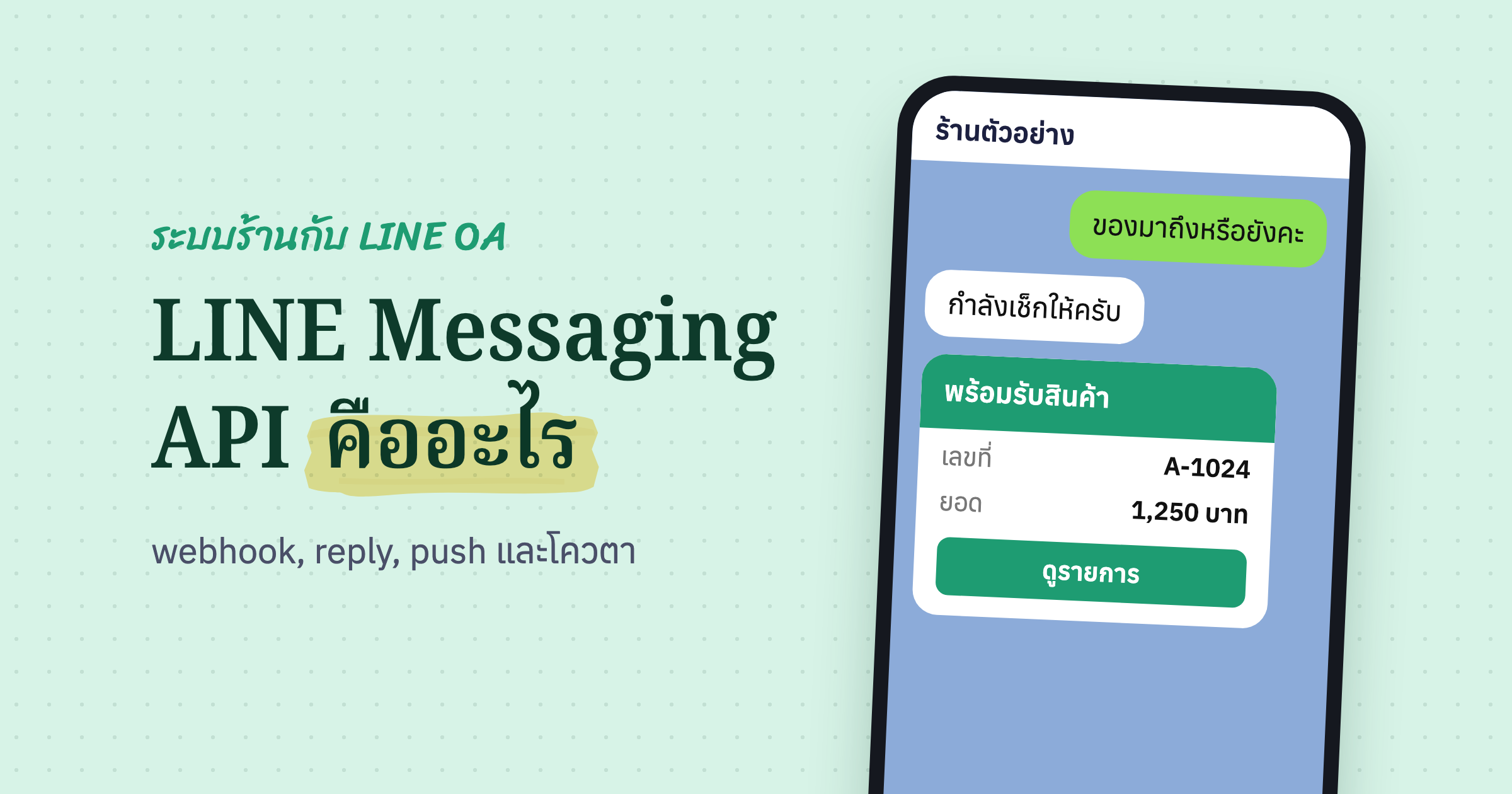
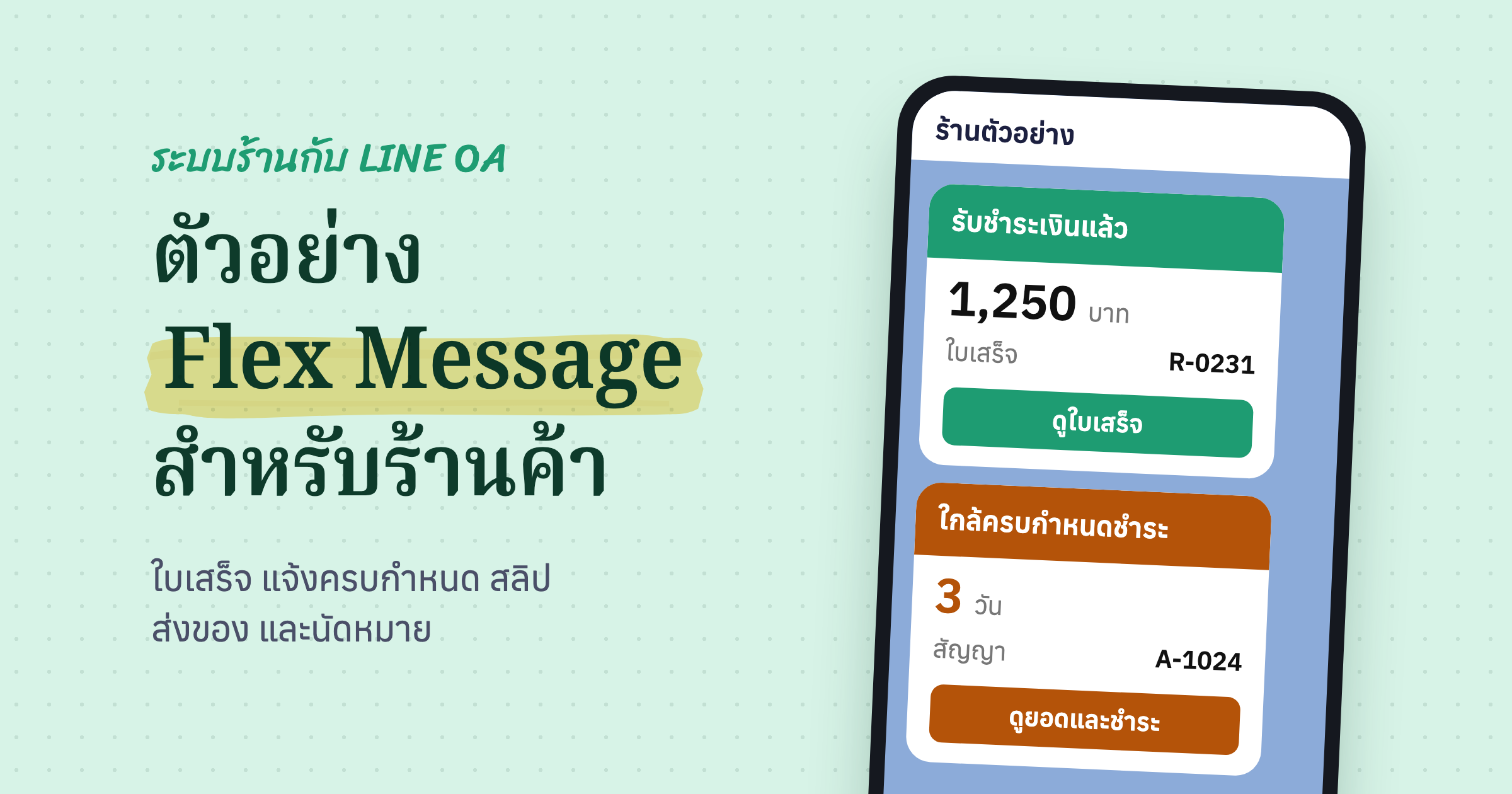
หน้านี้รวมการ์ดที่ร้านใช้บ่อยไว้ให้คัดลอก แต่ละใบเป็นข้อความ flex ที่ครบทั้งก้อน วางลงใน messages ของคำสั่ง reply หรือ push ได้ทันที ถ้ายังไม่คุ้นกับ bubble, box และ flex อ่านวิธีจัดหน้า Flex Message ก่อนได้
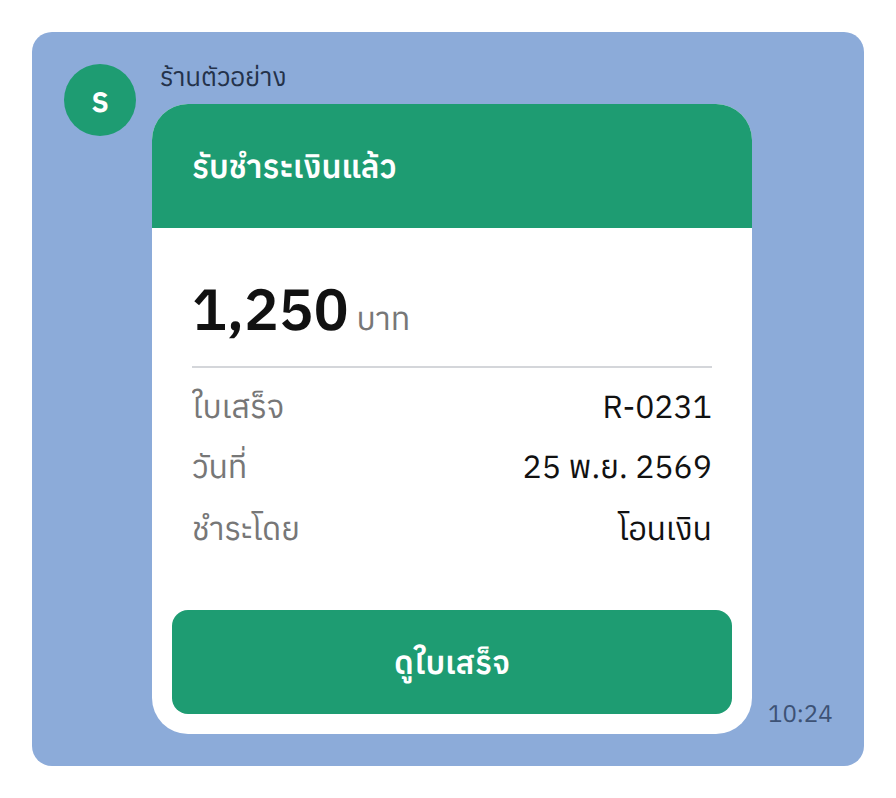
รูปเหนือ JSON แต่ละก้อนวาดตาม JSON ก้อนนั้น ในแอปจริงระยะและฟอนต์ต่างกันได้ตามเครื่อง ข้อมูลทั้งหมดเป็นข้อมูลสมมติ
สีและโครงที่ใช้ร่วมกันทุกใบ
ลูกค้าที่ได้ข้อความจากร้านบ่อย ๆ จะจำสีได้ก่อนอ่าน จึงให้สีบอกแค่เรื่องเดียวคือลูกค้าต้องทำอะไรต่อไหม
| สีหัวการ์ด | ความหมาย | ใช้กับ |
|---|---|---|
เขียว #1E9C72 |
เรียบร้อยแล้ว ไม่ต้องทำอะไร | รับเงินแล้ว ส่งของแล้ว สรุปยอด |
เหลืองอำพัน #B45309 |
ยังมีขั้นต่อไป | ใกล้ครบกำหนด รอตรวจ รอยืนยัน |
กุหลาบ #BE123C |
ต้องแก้ไขหรือรีบทำ | เลยกำหนด สลิปไม่ผ่าน |
โครงของทุกใบเหมือนกัน
- header พื้นสีสถานะ ตัวหนังสือขาวตัวหนา ไม่เกินสี่ห้าคำ
- body เป็น box แนวตั้ง
spacing: mdถ้ามีตัวเลขที่สำคัญที่สุดให้อยู่บนสุดขนาดxxlแถวข้อมูลใช้ชื่อสีเทา#777777ทางซ้าย ค่าชิดขวา - footer มีปุ่ม
primaryหนึ่งปุ่ม สีเดียวกับ header ปุ่มที่สองใช้แบบsecondaryหรือlink - ไม่ใส่
sizeให้ bubble จึงเป็นmegaตามค่าเริ่มต้น ยกเว้น carousel ที่ใช้kilo
ร้านที่มีสีของตัวเองเปลี่ยนเขียวเป็นสีร้านได้ แต่เก็บเหลืองกับกุหลาบไว้ให้คงความหมายเดิม
ข้อความใน altText ไม่ควรมียอดเงินหรือข้อมูลส่วนตัว
altText ไปขึ้นในการแจ้งเตือนของเครื่อง รายการแชต และข้อความที่มีคนตอบกลับโดยอ้างถึง ซึ่งเป็นที่ที่คนข้าง ๆ อ่านได้โดยไม่ต้องเปิดแชต
- ใส่ได้ เรื่องอะไรกับเลขที่เอกสาร เช่น "รับชำระเงินแล้ว ใบเสร็จ R-0231"
- อยู่ในการ์ด ยอดที่จ่าย ยอดค้าง ยอดออม
- อยู่หลัง login ชื่อเต็ม ที่อยู่ เลขบัตร และประวัติทั้งหมด ให้ปุ่มพาไปเปิดใน LIFF
เรื่องหนี้และเงินออมเป็นเรื่องที่ลูกค้าอาจไม่อยากให้คนในบ้านเห็น ถ้าไม่แน่ใจ ใส่ในการ์ดแค่ว่ามีรายการใหม่ แล้วให้กดไปดูยอดใน LIFF
ใบเสร็จรับเงิน
ส่งเมื่อร้านยืนยันว่าเงินเข้าแล้ว ตัวเลขใหญ่บนสุดคือยอดที่รับ ลูกค้าเทียบกับที่โอนได้ทันที
{
  "type": "flex",
  "altText": "รับชำระเงินแล้ว ใบเสร็จ R-0231",
  "contents": {
    "type": "bubble",
    "header": {
      "type": "box",
      "layout": "vertical",
      "backgroundColor": "#1E9C72",
      "contents": [
        { "type": "text", "text": "รับชำระเงินแล้ว", "color": "#FFFFFF", "weight": "bold" }
      ]
    },
    "body": {
      "type": "box",
      "layout": "vertical",
      "spacing": "md",
      "contents": [
        {
          "type": "box",
          "layout": "baseline",
          "contents": [
            {
              "type": "text",
              "text": "1,250",
              "size": "xxl",
              "weight": "bold",
              "color": "#111111",
              "flex": 0
            },
            {
              "type": "text",
              "text": "บาท",
              "color": "#777777",
              "margin": "sm",
              "flex": 0
            }
          ]
        },
        { "type": "separator" },
        {
          "type": "box",
          "layout": "horizontal",
          "contents": [
            { "type": "text", "text": "ใบเสร็จ", "color": "#777777", "flex": 0 },
            { "type": "text", "text": "R-0231", "align": "end", "wrap": true }
          ]
        },
        {
          "type": "box",
          "layout": "horizontal",
          "contents": [
            { "type": "text", "text": "วันที่", "color": "#777777", "flex": 0 },
            { "type": "text", "text": "25 พ.ย. 2569", "align": "end", "wrap": true }
          ]
        },
        {
          "type": "box",
          "layout": "horizontal",
          "contents": [
            { "type": "text", "text": "ชำระโดย", "color": "#777777", "flex": 0 },
            { "type": "text", "text": "โอนเงิน", "align": "end", "wrap": true }
          ]
        }
      ]
    },
    "footer": {
      "type": "box",
      "layout": "vertical",
      "contents": [
        {
          "type": "button",
          "style": "primary",
          "color": "#1E9C72",
          "action": {
            "type": "uri",
            "label": "ดูใบเสร็จ",
            "uri": "https://liff.line.me/1234567890-AbcdEfgh/receipts/R-0231"
          }
        }
      ]
    }
  }
}
ส่วนที่ต้องแก้ ยอด เลขที่ใบเสร็จ วันที่ วิธีชำระ และ LIFF ID ใน uri ถ้ามีส่วนลดหรือค่าธรรมเนียม เพิ่มเป็นแถวต่อจากเส้นคั่น แถวที่เป็นศูนย์ไม่ต้องใส่ การ์ดจะสั้นลง
แจ้งครบกำหนดชำระ
ส่งก่อนวันครบกำหนดไม่กี่วัน หรือหลังเลยกำหนด เลขใหญ่เป็นจำนวนวัน เพราะเป็นเรื่องที่อยากให้ลูกค้าเห็นก่อน ส่วนยอดให้กดไปดูใน LIFF
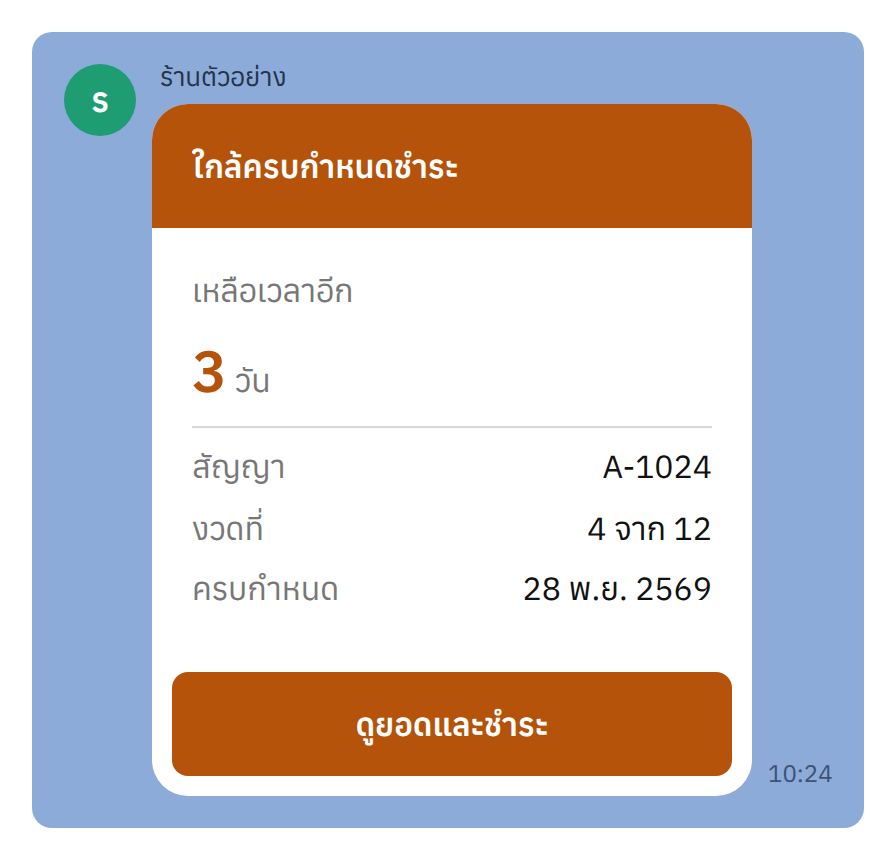
{
  "type": "flex",
  "altText": "ใกล้ครบกำหนดชำระ สัญญา A-1024",
  "contents": {
    "type": "bubble",
    "header": {
      "type": "box",
      "layout": "vertical",
      "backgroundColor": "#B45309",
      "contents": [
        {
          "type": "text",
          "text": "ใกล้ครบกำหนดชำระ",
          "color": "#FFFFFF",
          "weight": "bold"
        }
      ]
    },
    "body": {
      "type": "box",
      "layout": "vertical",
      "spacing": "md",
      "contents": [
        { "type": "text", "text": "เหลือเวลาอีก", "color": "#777777" },
        {
          "type": "box",
          "layout": "baseline",
          "contents": [
            {
              "type": "text",
              "text": "3",
              "size": "xxl",
              "weight": "bold",
              "color": "#B45309",
              "flex": 0
            },
            {
              "type": "text",
              "text": "วัน",
              "color": "#777777",
              "margin": "sm",
              "flex": 0
            }
          ]
        },
        { "type": "separator" },
        {
          "type": "box",
          "layout": "horizontal",
          "contents": [
            { "type": "text", "text": "สัญญา", "color": "#777777", "flex": 0 },
            { "type": "text", "text": "A-1024", "align": "end", "wrap": true }
          ]
        },
        {
          "type": "box",
          "layout": "horizontal",
          "contents": [
            { "type": "text", "text": "งวดที่", "color": "#777777", "flex": 0 },
            { "type": "text", "text": "4 จาก 12", "align": "end", "wrap": true }
          ]
        },
        {
          "type": "box",
          "layout": "horizontal",
          "contents": [
            { "type": "text", "text": "ครบกำหนด", "color": "#777777", "flex": 0 },
            { "type": "text", "text": "28 พ.ย. 2569", "align": "end", "wrap": true }
          ]
        }
      ]
    },
    "footer": {
      "type": "box",
      "layout": "vertical",
      "contents": [
        {
          "type": "button",
          "style": "primary",
          "color": "#B45309",
          "action": {
            "type": "uri",
            "label": "ดูยอดและชำระ",
            "uri": "https://liff.line.me/1234567890-AbcdEfgh/contracts/A-1024"
          }
        }
      ]
    }
  }
}
พอเลยกำหนด ใช้โครงเดิมแล้วเปลี่ยนสี่จุด
| จุด | ใกล้ครบกำหนด | เลยกำหนด |
|---|---|---|
| สี (header ตัวเลข และปุ่ม) | #B45309 |
#BE123C |
| หัวการ์ด | ใกล้ครบกำหนดชำระ | เลยกำหนดชำระ |
| บรรทัดเหนือตัวเลข | เหลือเวลาอีก | เลยกำหนดมาแล้ว |
altText |
ใกล้ครบกำหนดชำระ สัญญา A-1024 | เลยกำหนดชำระ สัญญา A-1024 |
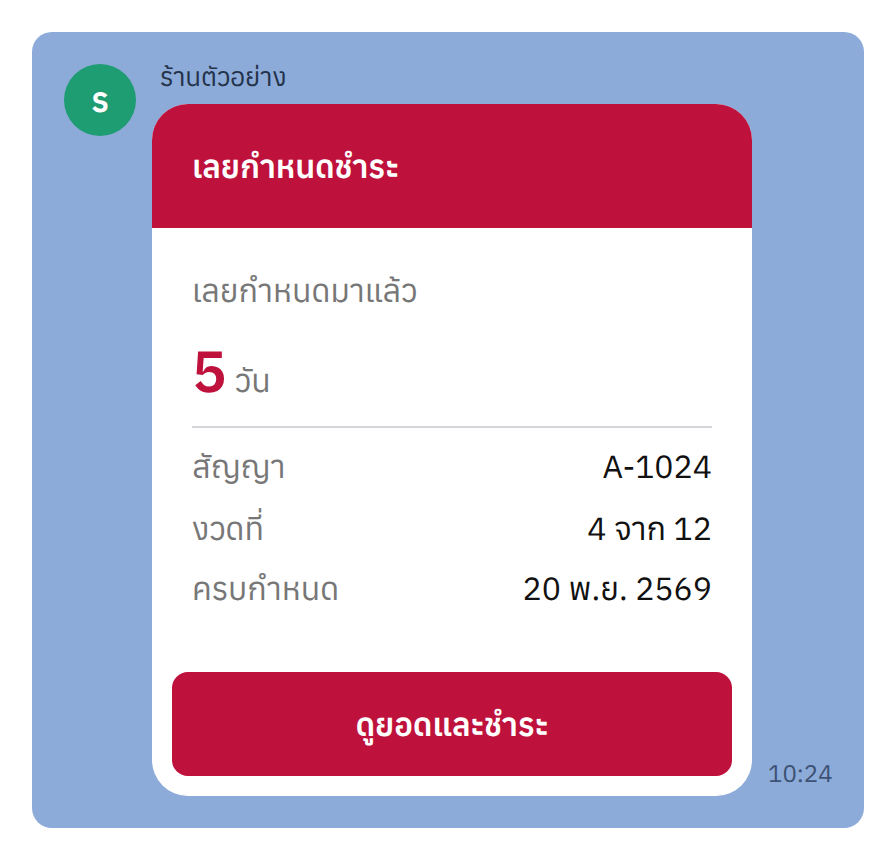
ส่วนที่ต้องแก้ คำว่าสัญญาเปลี่ยนเป็นออเดอร์หรือบิลตามธุรกิจ และข้อความควรบอกแค่ข้อเท็จจริง การแจ้งวันครบกำหนดเป็น push ที่นับโควตา ถ้าต้องส่งพร้อมกันหลายร้อยราย อ่านวิธีส่ง push ไม่ให้ซ้ำหรือหายก่อนตั้งงานประจำวัน
รับสลิปแล้ว
ตอบทันทีหลังลูกค้าส่งรูป ลูกค้าจะได้ไม่ต้องถามซ้ำว่าถึงหรือยัง ใบนี้เป็นสีเหลืองเพราะยังต้องรอร้านตรวจ และไม่มีปุ่มเพราะลูกค้าไม่ต้องทำอะไร
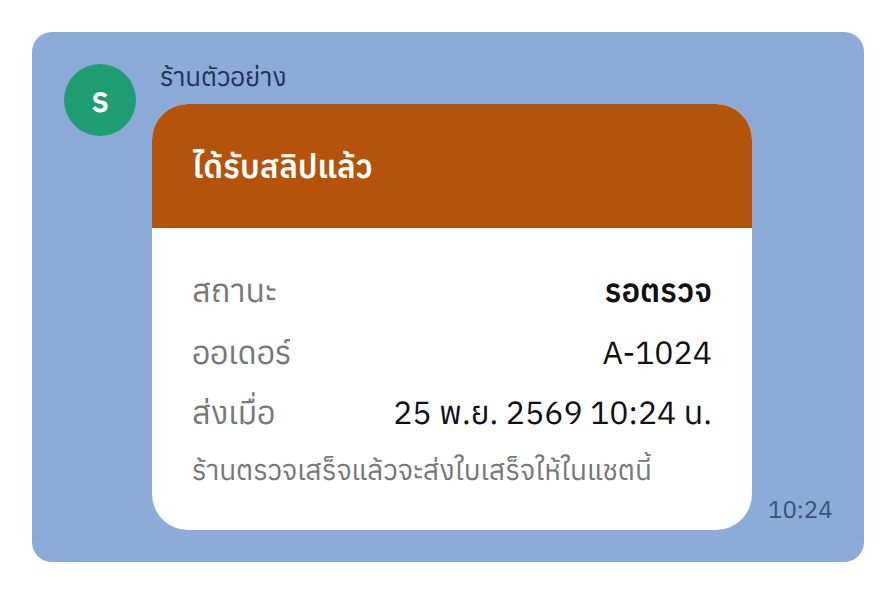
{
  "type": "flex",
  "altText": "ได้รับสลิปแล้ว รอตรวจ",
  "contents": {
    "type": "bubble",
    "header": {
      "type": "box",
      "layout": "vertical",
      "backgroundColor": "#B45309",
      "contents": [
        { "type": "text", "text": "ได้รับสลิปแล้ว", "color": "#FFFFFF", "weight": "bold" }
      ]
    },
    "body": {
      "type": "box",
      "layout": "vertical",
      "spacing": "md",
      "contents": [
        {
          "type": "box",
          "layout": "horizontal",
          "contents": [
            { "type": "text", "text": "สถานะ", "color": "#777777", "flex": 0 },
            { "type": "text", "text": "รอตรวจ", "align": "end", "weight": "bold" }
          ]
        },
        {
          "type": "box",
          "layout": "horizontal",
          "contents": [
            { "type": "text", "text": "ออเดอร์", "color": "#777777", "flex": 0 },
            { "type": "text", "text": "A-1024", "align": "end", "wrap": true }
          ]
        },
        {
          "type": "box",
          "layout": "horizontal",
          "contents": [
            { "type": "text", "text": "ส่งเมื่อ", "color": "#777777", "flex": 0 },
            {
              "type": "text",
              "text": "25 พ.ย. 2569 10:24 น.",
              "align": "end",
              "wrap": true
            }
          ]
        },
        {
          "type": "text",
          "text": "ร้านตรวจเสร็จแล้วจะส่งใบเสร็จให้ในแชตนี้",
          "size": "sm",
          "color": "#777777",
          "wrap": true
        }
      ]
    }
  }
}
ส่วนที่ต้องแก้ บรรทัดท้ายควรบอกว่าจะเกิดอะไรต่อ ถ้ายังไม่รู้ว่าสลิปเป็นของออเดอร์ไหน ตัดแถวออเดอร์ออก ใบนี้ตอบจาก webhook ด้วย reply token ได้ โดยควรใช้ภายใน 1 นาที หลังจากนั้น LINE ไม่รับประกัน และ Reply API ในไทยจะเปลี่ยนเงื่อนไขตั้งแต่ 1 ก.พ. 2570 ดูในบทเรื่อง Reply API
สลิปยังไม่ผ่าน
ส่งเมื่อพนักงานหรือระบบตรวจแล้วพบว่าใช้ไม่ได้ บรรทัดแรกของ body คือเหตุผล แถวถัดมาให้ตัวเลขที่เทียบกันได้ แล้วปิดด้วยสิ่งที่ต้องทำ
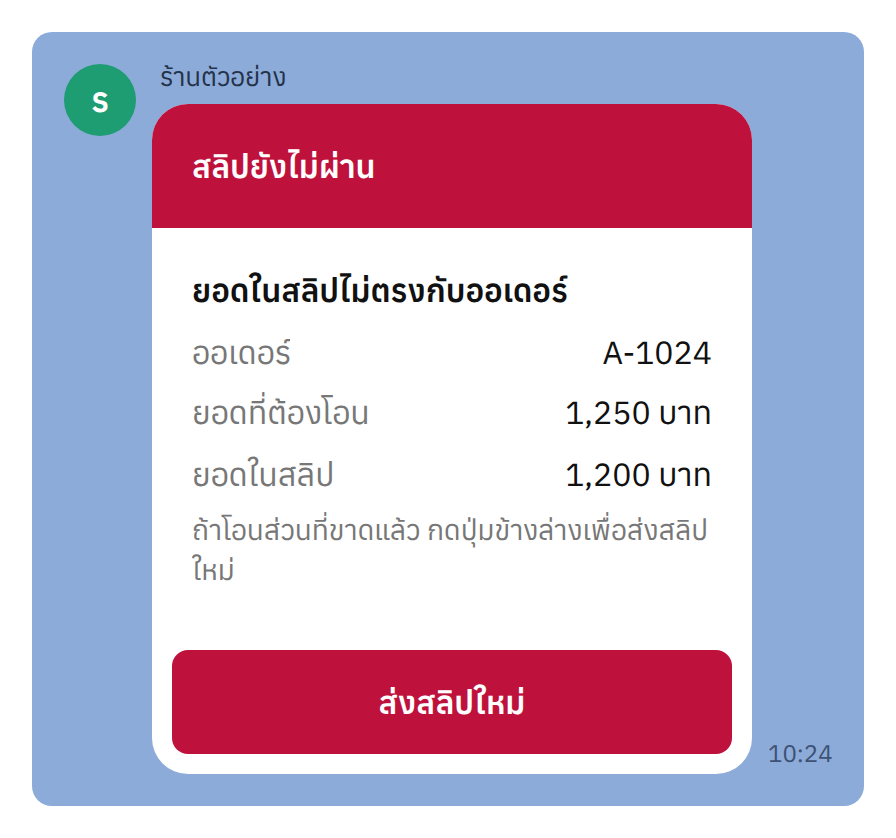
{
  "type": "flex",
  "altText": "สลิปยังไม่ผ่าน กรุณาส่งใหม่",
  "contents": {
    "type": "bubble",
    "header": {
      "type": "box",
      "layout": "vertical",
      "backgroundColor": "#BE123C",
      "contents": [
        { "type": "text", "text": "สลิปยังไม่ผ่าน", "color": "#FFFFFF", "weight": "bold" }
      ]
    },
    "body": {
      "type": "box",
      "layout": "vertical",
      "spacing": "md",
      "contents": [
        {
          "type": "text",
          "text": "ยอดในสลิปไม่ตรงกับออเดอร์",
          "weight": "bold",
          "wrap": true
        },
        {
          "type": "box",
          "layout": "horizontal",
          "contents": [
            { "type": "text", "text": "ออเดอร์", "color": "#777777", "flex": 0 },
            { "type": "text", "text": "A-1024", "align": "end", "wrap": true }
          ]
        },
        {
          "type": "box",
          "layout": "horizontal",
          "contents": [
            { "type": "text", "text": "ยอดที่ต้องโอน", "color": "#777777", "flex": 0 },
            { "type": "text", "text": "1,250 บาท", "align": "end", "wrap": true }
          ]
        },
        {
          "type": "box",
          "layout": "horizontal",
          "contents": [
            { "type": "text", "text": "ยอดในสลิป", "color": "#777777", "flex": 0 },
            { "type": "text", "text": "1,200 บาท", "align": "end", "wrap": true }
          ]
        },
        {
          "type": "text",
          "text": "ถ้าโอนส่วนที่ขาดแล้ว กดปุ่มข้างล่างเพื่อส่งสลิปใหม่",
          "size": "sm",
          "color": "#777777",
          "wrap": true
        }
      ]
    },
    "footer": {
      "type": "box",
      "layout": "vertical",
      "contents": [
        {
          "type": "button",
          "style": "primary",
          "color": "#BE123C",
          "action": {
            "type": "uri",
            "label": "ส่งสลิปใหม่",
            "uri": "https://liff.line.me/1234567890-AbcdEfgh/orders/A-1024/slip"
          }
        }
      ]
    }
  }
}
ส่วนที่ต้องแก้ เหตุผลในบรรทัดแรก เช่น "รูปไม่ชัด อ่านเลขอ้างอิงไม่ได้" หรือ "สลิปนี้ใช้ไปแล้ว" ถ้าพนักงานพิมพ์เหตุผลเอง ให้ระบบเตรียมตัวเลือกไว้ ข้อความที่ถึงลูกค้าจะได้สุภาพเหมือนกันทุกครั้ง แถวยอดเงินใช้เฉพาะเหตุผลที่เกี่ยวกับยอด
สรุปยอดออม
ส่งตามรอบเดือนหรือหลังฝาก แถบความคืบหน้าเป็น box ซ้อนกันสองชั้น ชั้นในกำหนด width เป็น % ของชั้นนอก ไม่ต้องใช้รูป
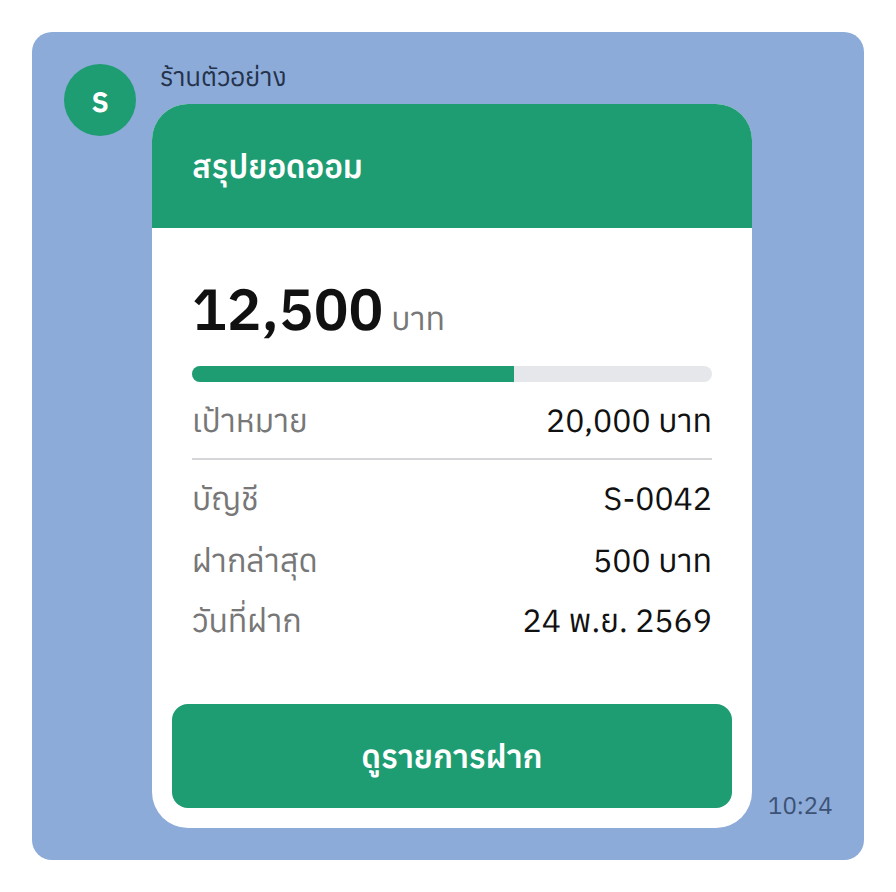
{
  "type": "flex",
  "altText": "สรุปยอดออมประจำเดือน",
  "contents": {
    "type": "bubble",
    "header": {
      "type": "box",
      "layout": "vertical",
      "backgroundColor": "#1E9C72",
      "contents": [
        { "type": "text", "text": "สรุปยอดออม", "color": "#FFFFFF", "weight": "bold" }
      ]
    },
    "body": {
      "type": "box",
      "layout": "vertical",
      "spacing": "md",
      "contents": [
        {
          "type": "box",
          "layout": "baseline",
          "contents": [
            {
              "type": "text",
              "text": "12,500",
              "size": "xxl",
              "weight": "bold",
              "color": "#111111",
              "flex": 0
            },
            {
              "type": "text",
              "text": "บาท",
              "color": "#777777",
              "margin": "sm",
              "flex": 0
            }
          ]
        },
        {
          "type": "box",
          "layout": "vertical",
          "backgroundColor": "#E5E7EB",
          "cornerRadius": "sm",
          "contents": [
            {
              "type": "box",
              "layout": "vertical",
              "width": "62%",
              "height": "8px",
              "backgroundColor": "#1E9C72",
              "contents": []
            }
          ]
        },
        {
          "type": "box",
          "layout": "horizontal",
          "contents": [
            { "type": "text", "text": "เป้าหมาย", "color": "#777777", "flex": 0 },
            { "type": "text", "text": "20,000 บาท", "align": "end", "wrap": true }
          ]
        },
        { "type": "separator" },
        {
          "type": "box",
          "layout": "horizontal",
          "contents": [
            { "type": "text", "text": "บัญชี", "color": "#777777", "flex": 0 },
            { "type": "text", "text": "S-0042", "align": "end", "wrap": true }
          ]
        },
        {
          "type": "box",
          "layout": "horizontal",
          "contents": [
            { "type": "text", "text": "ฝากล่าสุด", "color": "#777777", "flex": 0 },
            { "type": "text", "text": "500 บาท", "align": "end", "wrap": true }
          ]
        },
        {
          "type": "box",
          "layout": "horizontal",
          "contents": [
            { "type": "text", "text": "วันที่ฝาก", "color": "#777777", "flex": 0 },
            { "type": "text", "text": "24 พ.ย. 2569", "align": "end", "wrap": true }
          ]
        }
      ]
    },
    "footer": {
      "type": "box",
      "layout": "vertical",
      "contents": [
        {
          "type": "button",
          "style": "primary",
          "color": "#1E9C72",
          "action": {
            "type": "uri",
            "label": "ดูรายการฝาก",
            "uri": "https://liff.line.me/1234567890-AbcdEfgh/savings/S-0042"
          }
        }
      ]
    }
  }
}
ส่วนที่ต้องแก้ คำนวณ width จากยอดต่อเป้าหมาย ปัดเป็นจำนวนเต็ม และไม่ให้เกิน 100% ถ้าบัญชีไม่มีเป้าหมาย ตัดแถบกับแถวเป้าหมายออก box ว่างต้องมี "contents": [] เสมอเพราะเป็น property ที่บังคับ ถ้าเลือกไม่ใส่ยอดในแชต ให้ใช้ใบเสร็จเป็นต้นแบบแล้วตัดตัวเลขใหญ่ออก
แจ้งส่งของ
ส่งเมื่อได้เลขพัสดุ ปุ่มแรกพาไปหน้าติดตามของขนส่ง ปุ่มที่สองคัดลอกเลขพัสดุด้วย clipboard action ซึ่งใช้ได้บน LINE 14.0.0 ขึ้นไปของ iOS และ Android
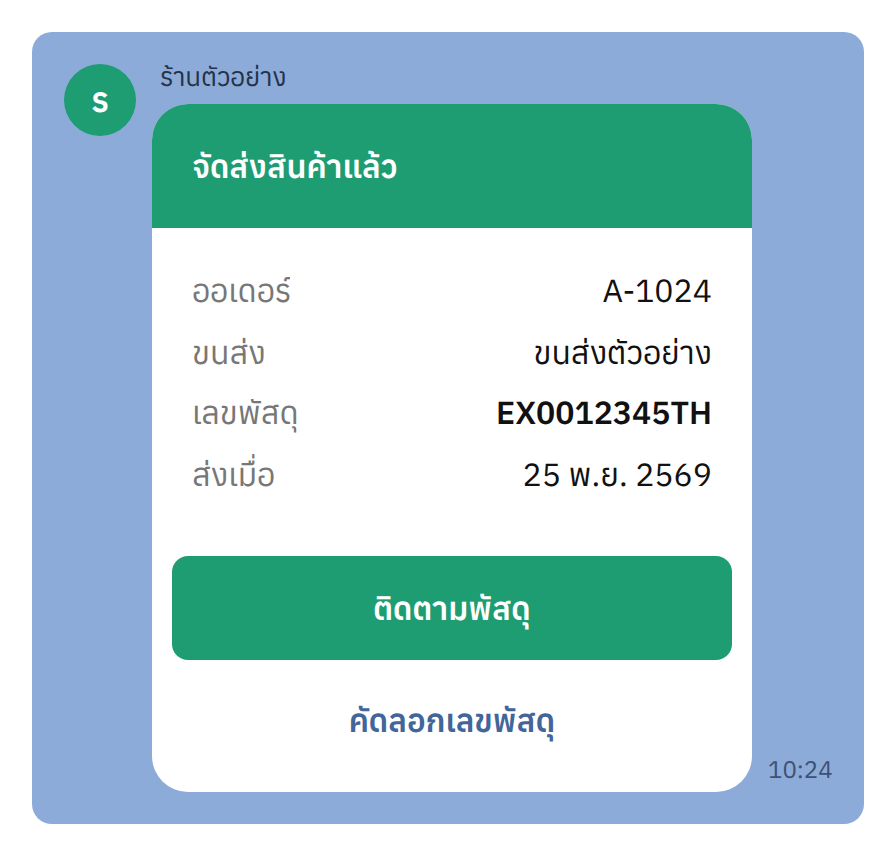
{
  "type": "flex",
  "altText": "จัดส่งสินค้าแล้ว ออเดอร์ A-1024",
  "contents": {
    "type": "bubble",
    "header": {
      "type": "box",
      "layout": "vertical",
      "backgroundColor": "#1E9C72",
      "contents": [
        { "type": "text", "text": "จัดส่งสินค้าแล้ว", "color": "#FFFFFF", "weight": "bold" }
      ]
    },
    "body": {
      "type": "box",
      "layout": "vertical",
      "spacing": "md",
      "contents": [
        {
          "type": "box",
          "layout": "horizontal",
          "contents": [
            { "type": "text", "text": "ออเดอร์", "color": "#777777", "flex": 0 },
            { "type": "text", "text": "A-1024", "align": "end", "wrap": true }
          ]
        },
        {
          "type": "box",
          "layout": "horizontal",
          "contents": [
            { "type": "text", "text": "ขนส่ง", "color": "#777777", "flex": 0 },
            { "type": "text", "text": "ขนส่งตัวอย่าง", "align": "end", "wrap": true }
          ]
        },
        {
          "type": "box",
          "layout": "horizontal",
          "contents": [
            { "type": "text", "text": "เลขพัสดุ", "color": "#777777", "flex": 0 },
            { "type": "text", "text": "EX0012345TH", "align": "end", "weight": "bold" }
          ]
        },
        {
          "type": "box",
          "layout": "horizontal",
          "contents": [
            { "type": "text", "text": "ส่งเมื่อ", "color": "#777777", "flex": 0 },
            { "type": "text", "text": "25 พ.ย. 2569", "align": "end", "wrap": true }
          ]
        }
      ]
    },
    "footer": {
      "type": "box",
      "layout": "vertical",
      "spacing": "sm",
      "contents": [
        {
          "type": "button",
          "style": "primary",
          "color": "#1E9C72",
          "action": {
            "type": "uri",
            "label": "ติดตามพัสดุ",
            "uri": "https://example.com/track/EX0012345TH"
          }
        },
        {
          "type": "button",
          "action": {
            "type": "clipboard",
            "label": "คัดลอกเลขพัสดุ",
            "clipboardText": "EX0012345TH"
          }
        }
      ]
    }
  }
}
ส่วนที่ต้องแก้ URL ติดตามของขนส่งที่ร้านใช้ เลขพัสดุมีสามที่คือแถวข้อมูล uri และ clipboardText ให้มาจากตัวแปรเดียวกัน ถ้าลูกค้ารับของที่ร้าน ใช้การ์ดพร้อมรับสินค้าแทน
สินค้าแบบ carousel
ใช้ตอบเมื่อลูกค้าถามหาของ หรือส่งสินค้ามาใหม่ ลูกค้าเลื่อนดูด้านข้างแล้วกดใบที่สนใจ
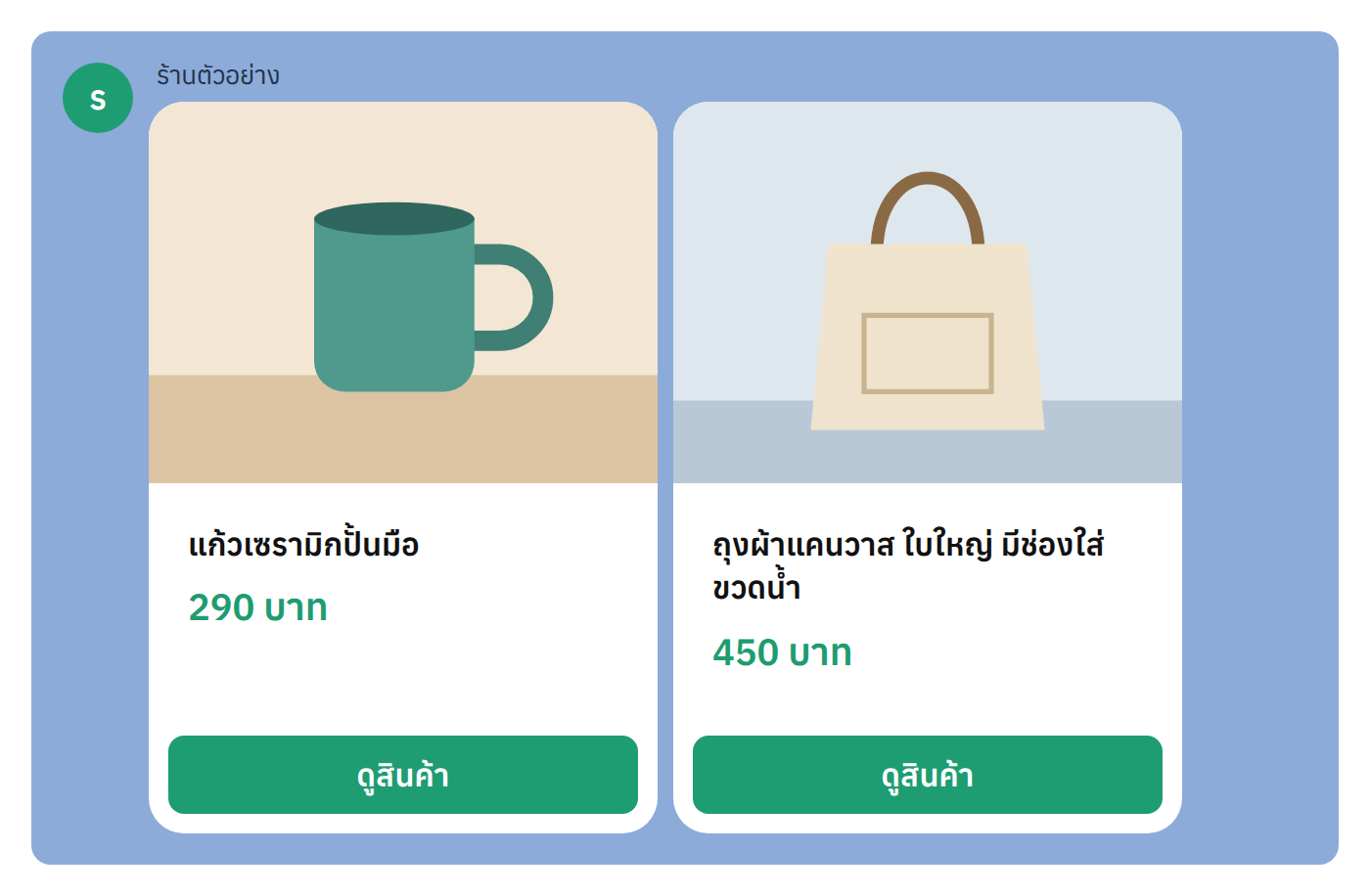
{
  "type": "flex",
  "altText": "สินค้ามาใหม่สัปดาห์นี้ 2 รายการ",
  "contents": {
    "type": "carousel",
    "contents": [
      {
        "type": "bubble",
        "size": "kilo",
        "hero": {
          "type": "image",
          "url": "https://example.com/images/mug.jpg",
          "size": "full",
          "aspectRatio": "4:3",
          "aspectMode": "cover"
        },
        "body": {
          "type": "box",
          "layout": "vertical",
          "spacing": "md",
          "contents": [
            {
              "type": "text",
              "text": "แก้วเซรามิกปั้นมือ",
              "weight": "bold",
              "wrap": true,
              "maxLines": 2
            },
            {
              "type": "text",
              "text": "290 บาท",
              "size": "lg",
              "color": "#1E9C72",
              "weight": "bold"
            }
          ]
        },
        "footer": {
          "type": "box",
          "layout": "vertical",
          "contents": [
            {
              "type": "button",
              "style": "primary",
              "color": "#1E9C72",
              "action": {
                "type": "uri",
                "label": "ดูสินค้า",
                "uri": "https://liff.line.me/1234567890-AbcdEfgh/products/11"
              },
              "height": "sm"
            }
          ]
        }
      },
      {
        "type": "bubble",
        "size": "kilo",
        "hero": {
          "type": "image",
          "url": "https://example.com/images/bag.jpg",
          "size": "full",
          "aspectRatio": "4:3",
          "aspectMode": "cover"
        },
        "body": {
          "type": "box",
          "layout": "vertical",
          "spacing": "md",
          "contents": [
            {
              "type": "text",
              "text": "ถุงผ้าแคนวาส ใบใหญ่ มีช่องใส่ขวดน้ำ",
              "weight": "bold",
              "wrap": true,
              "maxLines": 2
            },
            {
              "type": "text",
              "text": "450 บาท",
              "size": "lg",
              "color": "#1E9C72",
              "weight": "bold"
            }
          ]
        },
        "footer": {
          "type": "box",
          "layout": "vertical",
          "contents": [
            {
              "type": "button",
              "style": "primary",
              "color": "#1E9C72",
              "action": {
                "type": "uri",
                "label": "ดูสินค้า",
                "uri": "https://liff.line.me/1234567890-AbcdEfgh/products/12"
              },
              "height": "sm"
            }
          ]
        }
      }
    ]
  }
}
ส่วนที่ต้องแก้ เพิ่ม bubble ได้ถึง 12 ใบ และ JSON รวมไม่เกิน 50 KB ทุกใบใช้ size เดียวกัน รูปใช้ URL แบบ HTTPS เป็น JPEG หรือ PNG ไม่เกิน 1024 × 1024 px ถ้าเตรียมรูปสัดส่วน 4:3 ไว้ทุกตัว cover จะไม่ตัดขอบสินค้า ชื่อยาวจำกัดที่สองบรรทัดด้วย maxLines และ LINE ยืด body ของใบอื่นให้สูงเท่ากัน
ยืนยันนัดหมาย
ส่งก่อนวันนัดให้ลูกค้ากดตอบในแชต สองปุ่มเป็น postback ระบบจึงรู้ว่ากดอะไรโดยไม่ต้องอ่านข้อความ ส่วน displayText คือข้อความที่ขึ้นในแชตเหมือนลูกค้าพิมพ์เอง
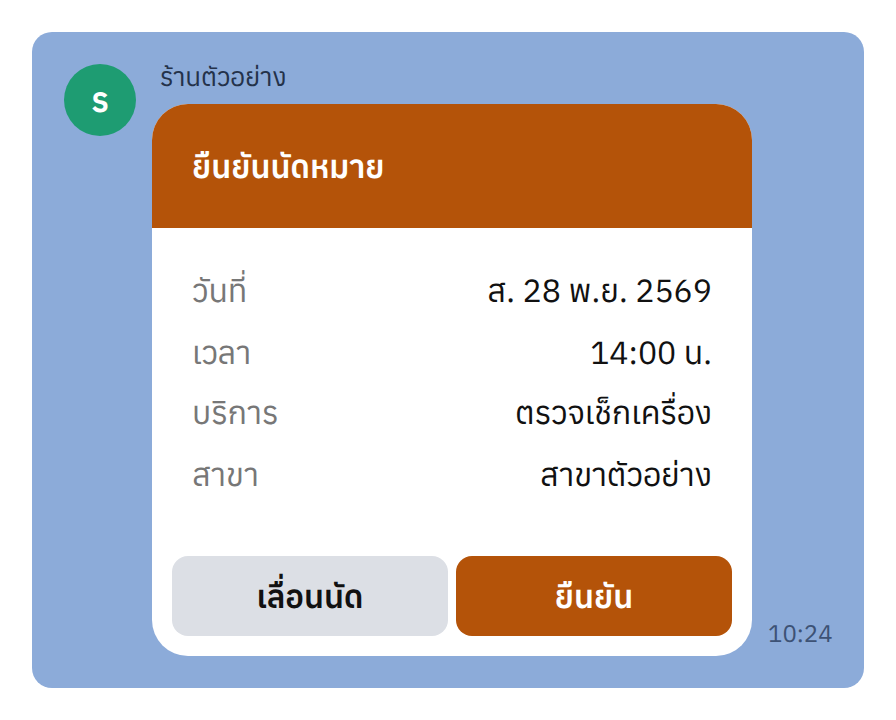
{
  "type": "flex",
  "altText": "กรุณายืนยันนัดหมาย",
  "contents": {
    "type": "bubble",
    "header": {
      "type": "box",
      "layout": "vertical",
      "backgroundColor": "#B45309",
      "contents": [
        { "type": "text", "text": "ยืนยันนัดหมาย", "color": "#FFFFFF", "weight": "bold" }
      ]
    },
    "body": {
      "type": "box",
      "layout": "vertical",
      "spacing": "md",
      "contents": [
        {
          "type": "box",
          "layout": "horizontal",
          "contents": [
            { "type": "text", "text": "วันที่", "color": "#777777", "flex": 0 },
            { "type": "text", "text": "ส. 28 พ.ย. 2569", "align": "end", "wrap": true }
          ]
        },
        {
          "type": "box",
          "layout": "horizontal",
          "contents": [
            { "type": "text", "text": "เวลา", "color": "#777777", "flex": 0 },
            { "type": "text", "text": "14:00 น.", "align": "end", "wrap": true }
          ]
        },
        {
          "type": "box",
          "layout": "horizontal",
          "contents": [
            { "type": "text", "text": "บริการ", "color": "#777777", "flex": 0 },
            { "type": "text", "text": "ตรวจเช็กเครื่อง", "align": "end", "wrap": true }
          ]
        },
        {
          "type": "box",
          "layout": "horizontal",
          "contents": [
            { "type": "text", "text": "สาขา", "color": "#777777", "flex": 0 },
            { "type": "text", "text": "สาขาตัวอย่าง", "align": "end", "wrap": true }
          ]
        }
      ]
    },
    "footer": {
      "type": "box",
      "layout": "horizontal",
      "spacing": "sm",
      "contents": [
        {
          "type": "button",
          "height": "sm",
          "style": "secondary",
          "action": {
            "type": "postback",
            "label": "เลื่อนนัด",
            "data": "action=reschedule&appointment=88",
            "displayText": "ขอเลื่อนนัด"
          }
        },
        {
          "type": "button",
          "height": "sm",
          "style": "primary",
          "color": "#B45309",
          "action": {
            "type": "postback",
            "label": "ยืนยัน",
            "data": "action=confirm&appointment=88",
            "displayText": "ยืนยันนัด"
          }
        }
      ]
    }
  }
}
ส่วนที่ต้องแก้ data ใส่อะไรก็ได้ไม่เกิน 300 ตัวอักษร ใส่แค่ชื่อคำสั่งกับเลขนัด ไม่ใส่ข้อมูลลูกค้า
การ์ดยังค้างอยู่ในแชตหลังกดแล้ว ลูกค้ากดซ้ำหรือกดตอนเลยวันนัดไปแล้วก็ได้ ตอนรับ postback จึงดูสถานะนัดก่อนทุกครั้ง และเช็กว่านัดนั้นเป็นของ userId ที่กดมา
ถ้าอยากให้ลูกค้าเลือกวันใหม่ได้เลย เปลี่ยนปุ่มเลื่อนนัดเป็น datetimepicker ซึ่งส่งวันเวลาที่เลือกกลับมาเป็น postback เหมือนกัน
ตรวจก่อนส่งให้ลูกค้าจริง
- เปลี่ยน
1234567890-AbcdEfghเป็น LIFF ID ของร้าน และexample.comเป็น URL จริง ค่าที่มีภาษาไทยหรือช่องว่างต้อง percent-encode - วางเฉพาะค่าของ
contentsใน Flex Message Simulator แล้วลองใส่ชื่อยาวที่สุดที่ระบบมี - ให้ LINE ตรวจทั้งข้อความโดยไม่ส่งจริงผ่าน validate endpoint วิธีเรียกและวิธีแยกการ์ดเป็นคลาสอยู่ในบทเขียน Flex ใน Laravel
- ปุ่มหนึ่งปุ่มมี
labelได้ 40 ตัวอักษร แต่ปุ่มคู่ในแถวเดียวควรสั้นกว่านั้นมาก